# GETTING STARTED

# API Links

# Test, demo, and production

If you want to access ONMARKET, you have three options depending on your purpose. The testing link is for developers who want to try out new features or fix bugs before they are released to the public. The demo link is for users who want to see how ONMARKET works and what it can do without affecting the real data. The production link is for users who want to use ONMARKET for their actual tasks and projects. Each link has a different URL and login credentials, so make sure you use the right one for your needs.

<table border="1" id="bkmrk-test-testapi.onmarke" style="border-collapse: collapse; width: 100.123%; height: 110px;"><colgroup><col style="width: 14.5859%;"></col><col style="width: 85.4141%;"></col></colgroup><tbody><tr><td>Test</td><td>testapi.onmarket.id</td></tr><tr><td>Demo</td><td>demoapi.onmarket.id</td></tr><tr><td>Production</td><td>api.onmarket.id</td></tr></tbody></table>

#### Other necessary links

These are links that necessary for authentication or other purposes.

<table border="1" id="bkmrk-name-link-details-us" style="border-collapse: collapse; width: 100%;"><colgroup><col style="width: 33.3333%;"></col><col style="width: 33.3333%;"></col><col style="width: 33.3333%;"></col></colgroup><tbody><tr><td>**Name**</td><td>**Link**</td><td>**Details**</td></tr><tr><td>USAPI

User State API

</td><td>Test**:**

**testusapi.onindonesia.id** Demo**:**

**demousapi.onindonesia.id** Production**:  
usapi.onindonesia.id**

</td><td>User related purpose ie, authentication, user details or user transactions.</td></tr></tbody></table>

# Authentication

To access the API a user has to have the *"Access System API"* permission enabled on one of their assigned roles. Permissions to content accessed via the API is limited by the roles &amp; permissions assigned to the user that's used to access the API.

Authentication to use the API is primarily done using API Tokens. Once the *"Access System API"* permission has been assigned to a user, a "API Tokens" section should be visible when editing their user profile. These values should be used as a header in API HTTP requests in the following format:

```
Authorization: Bearer <token>
```

Here's an example of an authorized Axios request to list books in the system:

```javascript
const axios = require('axios');

let config = {
  method: 'get',
  maxBodyLength: Infinity,
  url: 'https://testapi.onmarket.id/user/address/list?page=1',
  headers: { 
    'Authorization': 'Bearer eyJhbGciOiJIUzI1NiIsInR5cCI6IkpXVCJ9.eyJ1c2VyIjoidXNlcm5ldzEiLCJhZ2VudCI6bnVsbCwibmF0aXZlIjpmYWxzZSwiaWF0IjoxNjk5MzUwMDYxfQ.eg945MifOGFH2tz1aT0UgD0YFHziV4rellDF5isXVlQ'
  }
};

axios.request(config)
.then((response) => {
  console.log(JSON.stringify(response.data));
})
.catch((error) => {
  console.log(error);
});

```

To get this token, you need to use this particular link for authentication:

#### (POST) https://usapi.onindonesia.id/auth

<details id="bkmrk-body-parameters-user"><summary>Body parameters</summary>

username : &lt;string&gt;

password : &lt;string&gt;

options : &lt;object&gt;{

 nativeApp: &lt;boolean&gt;

}

<p class="callout info">For websites, use "false" value in nativeApp. For mobile phones, use "true" value in nativeApp.</p>

</details><details id="bkmrk-example-request-we%27r"><summary>Example request</summary>

<p class="callout info">We're using test link for this example. For production, use usapi.onindonesia.id</p>

```json
{
  "username": "usernew1",
  "password": "12345678",
  "options": {
    "nativeApp": false
  }
}
```

</details><details id="bkmrk-example-result-%7B-%22to"><summary>Example result</summary>

```json
{
    "token": "eyJhbGciOiJIUzI1NiIsInR5cCI6IkpXVCJ9.eyJ1c2VyIjoidXNlcm5ldzEiLCJhZ2VudCI6bnVsbCwibmF0aXZlIjpmYWxzZSwiaWF0IjoxNjk5MzUwMDYxfQ.eg945MifOGFH2tz1aT0UgD0YFHziV4rellDF5isXVlQ"
}
```

</details><details id="bkmrk-error-lists-422-unpr"><summary>Error lists</summary>

422 Unprocessable Entry

```json
{
    "message": "Invalid Credential"
}
```

400 Bad Request

```json
{
    "message": "Invalid JSON Format"
}
```
</details>

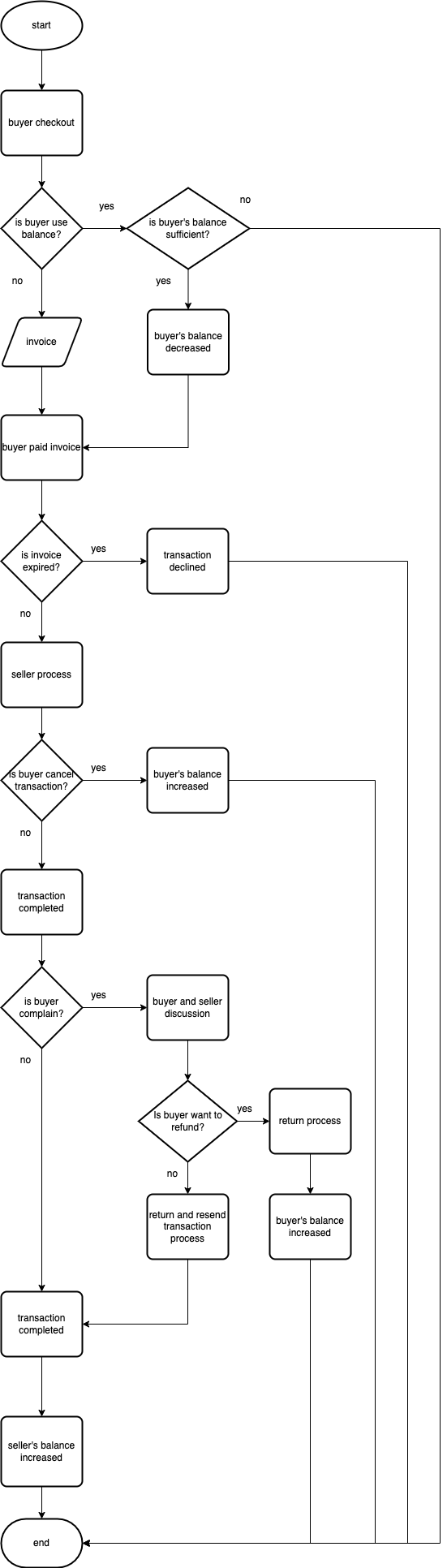
# Transaction flowchart

<div drawio-diagram="62"><img src="https://documentation.onindonesia.id/uploads/images/drawio/2024-01/drawing-3-1706606872.png" alt=""/></div>